The widget that keeps your steps in sight
The easiest way to walk more is to stop forgetting about it. That is the whole idea behind the Motiv widget: your step goal, on your home screen, every time you pick up your phone.
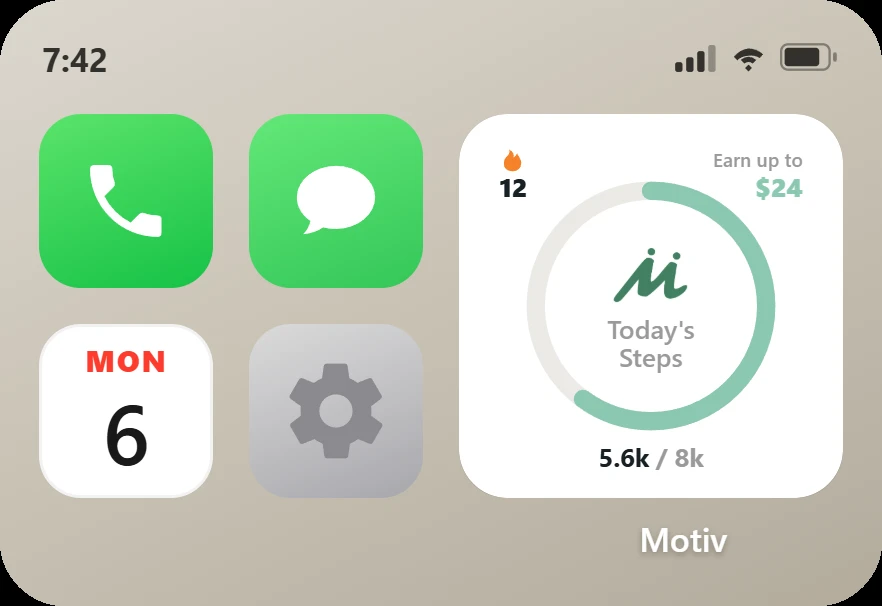
What it shows
- Today's steps against your goal, as a ring that fills while you walk.
- Your current streak.
- What you can still earn today, and when a reward is ready to claim.
You do not have to open the app to know where you stand. One glance tells you whether you are 300 steps short or 3,000.
Why a glance matters
Every habit starts with a cue. If nothing reminds you to walk, the day fills up with other things. A widget is a cue you see dozens of times a day without trying.
The ring matters too. People push harder as they get close to a finish line, which psychologists call the goal gradient effect. A ring that is almost closed at 4 p.m. is hard to leave alone.
What changed for walkers who added it
We looked at the first six weeks after the widget launched in July 2026. Walkers who added it took about 28% more steps on a typical day than walkers who did not: a median of 6,852 steps a day against 5,368.
They also hit their daily goal more often, on 56% of days compared with 45%.
A fair caveat: people who add a step widget may already be more motivated, so the widget is not the only reason for the gap. But the direction is clear, and it matches what we hear from walkers. Seeing the number is what gets them out the door.
How to add it
- Touch and hold an empty spot on your home screen until the apps jiggle.
- Tap the + button in the top corner and search for Motiv.
- Choose the Motiv Activity widget and tap Add Widget.
- Drag it where you will see it most, then tap Done.
There is also a mission in the app for adding the widget, so setting it up earns you credits toward your next challenge.
Add the widget, keep your steps in sight and put those extra steps to work in a challenge where walkers win real cash.